
Table of Contents
- Aircove go portable wi-fi 6 VPN router review: is it worth it
- Key features
- Pros and cons
- Customer reviews
- Frequently asked questions
- Where to buy
Aircove go portable wi-fi 6 VPN router review: is it worth it
If you travel often, you probably know the routine: juggling hotel Wi-Fi logins, dealing with spotty connections, and installing VPNs on every device. That's where the Aircove Go comes in. It's a tiny router with Wi-Fi 6 speeds and built-in VPN support, designed to make road-trip security and connectivity much easier to manage.
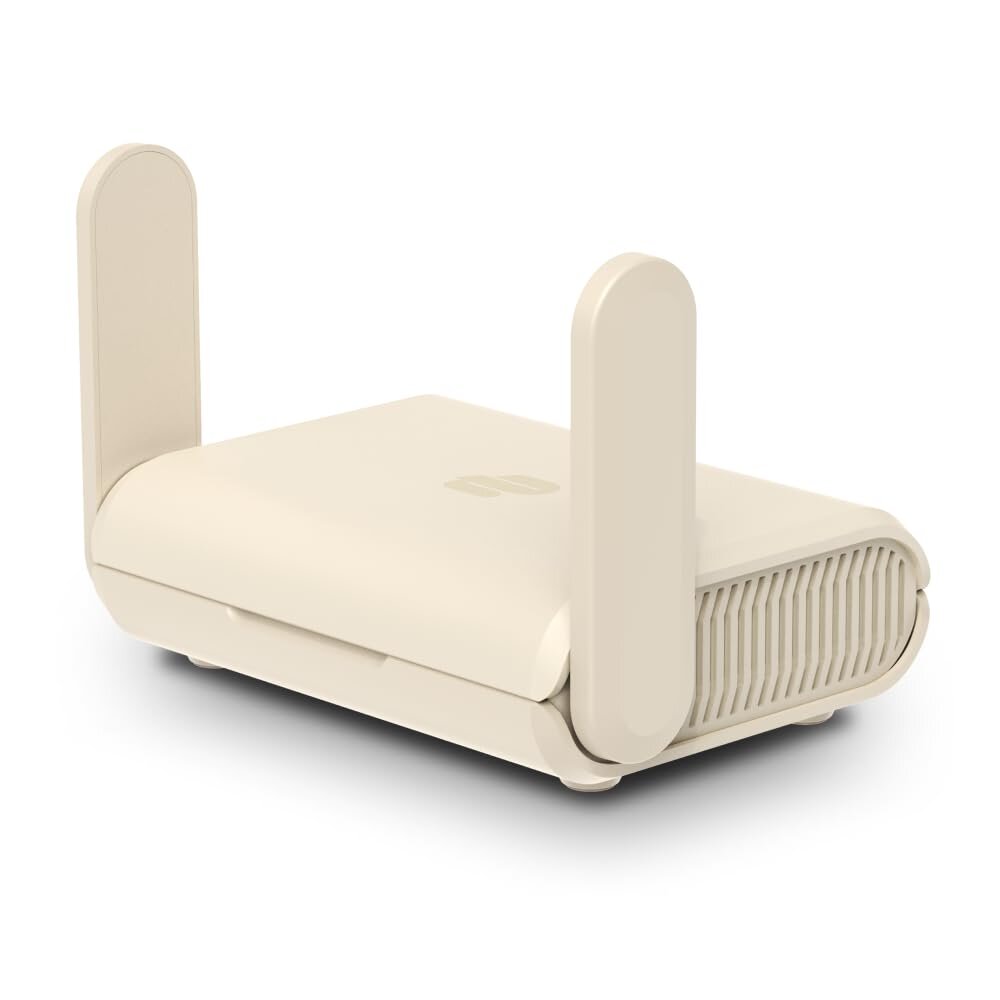
From what I've seen, it handles multiple devices at once and keeps your traffic protected on the go. Some users find the setup confusing, and a few have run into reliability problems over time. Still, its convenience and small size make it worth a look if you spend a lot of time traveling.
Overview of Aircove Go | Portable Wi-Fi 6 VPN Router
Travel already throws enough curveballs at you. Hotel Wi-Fi shouldn't be one of them. The Aircove Go tackles that problem as a compact router with built-in VPN support. It's small enough for a travel pouch, yet powerful enough to handle several devices at once.
I like that it supports both Ethernet and Wi-Fi, so you're not limited to one connection method. The built-in VPN works especially well if you already use ExpressVPN, although you'll need a separate subscription once the trial ends.
The downside? Setup isn't always smooth, and some users have reported connection issues with certain laptops. Durability also looks mixed. Some owners report steady performance, while others say their units failed early.
Pros
-
Super portable and lightweight
-
VPN protection for all your devices
-
Flexible connection options
Cons
-
Setup can get tricky
-
Only works in U.S. & Canada
-
Some users question reliability
Key features
Built-in VPN protection
The built-in VPN is the main attraction. Rather than installing an app on every device, you connect everything through the router and get coverage across the network. You'll need an active ExpressVPN subscription after the free trial, though. Setup can also feel a little unclear, so give yourself extra time the first time around.
Portable wi-fi 6 performance
The Aircove Go is tiny enough to carry anywhere, but it still uses Wi-Fi 6 for faster, steadier connections. It doesn't need an Ethernet cable, since it can connect to another Wi-Fi network. That flexibility helps while traveling, though your real-world speed still depends on the internet connection you find.
Multi-device connectivity
You can connect multiple devices at once without signing in separately each time. Phones, tablets, and even smart TVs can use the same protected network. A few buyers have reported compatibility problems with certain laptops, so the experience isn't always completely smooth.
Why multi-device setup rocks
-
No need for VPN apps on each gadget
-
Devices remember the network
-
Works with all sorts of electronics
Possible headaches
-
Some device-specific connection issues pop up
-
You'll need to manage your ExpressVPN account for full features
Advanced security and parental controls
You also get extras such as ad and tracker blocking, along with content filtering. Those tools can help families, though power users may find the parental controls fairly basic compared with larger home routers.
The Aircove Go combines VPN protection, portability, and added security tools. You'll still need to live with some setup quirks and occasional compatibility problems.
Pros and cons
No travel gear is perfect, and this little router has its limits. It offers several useful features, but you'll want to understand the tradeoffs before deciding whether it fits your setup.
Pros
-
Super portable: Toss it in your bag and barely notice it's there.
-
Covers all your devices: One connection protects your phone, tablet, laptop, and more.
-
Built-in VPN: It's seamless if you already use ExpressVPN, and it adds a useful layer of security.
-
Extras: Ad blocking, tracker blocking, and parental controls go beyond basic Wi-Fi.
-
Flexible connections: It runs off USB-C and works with Wi-Fi or Ethernet, which helps with odd hotel setups.
Cons
-
Region locked: This version only works in the U.S. and Canada. International travelers will need another model.
-
Tricky setup: The instructions aren't always clear, and setup can get frustrating when you're in a hurry.
-
Not perfect with every device: Some laptops may not cooperate, although most other devices seem fine.
-
Durability questions: A few owners say their units stopped working after a few months, so long-term reliability isn't guaranteed.
-
VPN subscription required: After the trial, you'll need an active ExpressVPN plan.
The Aircove Go balances portability and protection well, but its quirks may not suit every travel setup.
Customer reviews
I went through a range of user feedback, and most owners seem satisfied, though the complaints are worth noting. People like how easy the router is to carry and how well it works with an existing VPN account. Travelers especially say it helps them stay connected on the road.
Setup causes the most friction. The instructions could be clearer, and one user couldn't get the router working properly with a laptop even though other devices connected without trouble. Durability came up as well. One reviewer said their unit died in under a year, despite regular use.
Quick takeaways
-
Pros: Portable, works well with VPN, and reliable for streaming and travel.
-
Cons: Setup can be frustrating, the instructions need work, and some owners question its lifespan.
Travel experience and portability
Carrying extra tech isn’t much fun, so I pay attention when a small device actually earns space in my bag. The Aircove Go is about the size of a pocket router, making it easy to slip into a backpack or jacket pocket.
On the road, I appreciate that it runs on USB-C power. You can connect it to a laptop charger or portable battery, which helps when airport outlets are occupied or an older hotel room has only one convenient socket.
You still need to pack the cable and find a usable Wi-Fi source. For quick setups in rentals or co-working spaces, though, the small size feels genuinely practical rather than like a marketing trick.
Pros:
-
Tiny and easy to pack
-
USB-C power is very convenient
Cons:
-
You'll need to bring the cable
-
It needs a Wi-Fi source to work
Setup and ease of use
Getting the router running doesn't require much space, but the process isn't always as simple as it should be. I like that it draws power through USB-C and connects through Wi-Fi, so you don't have to rely on Ethernet.
Still, setup can be a pain. Some users describe the instructions as vague, and certain laptops require extra troubleshooting. Once you configure the network, your devices remember it, so reconnecting later takes very little effort.
Pros:
-
Quick to power on and compact
-
Usually works without Ethernet
- >
Devices auto-reconnect after the first setup
Cons:
-
The instructions could be clearer
-
Some devices may need a little fiddling
Frequently asked questions
How does the Aircove Go compare with other portable Wi-Fi 6 VPN routers on the market?
Honestly, the Aircove Go stands out because it has a built-in VPN. Many travel routers require extra apps on each device, and that gets annoying fast. The catch? It works with ExpressVPN, so you're out of luck if you prefer another service.
Can the Aircove Go's VPN speeds match home or office-based VPN solutions?
Usually, you won't get the same speeds as a wired home setup with a powerful router. For browsing, streaming, and general travel use, though, the connection stays stable. Move large files, and you'll probably notice the slowdown.
What unique features does the Aircove Go offer travelers who need secure internet access?
Portability is a major advantage. It runs from USB-C and connects through Wi-Fi or Ethernet, giving you options in hotels and rentals. I also like that it protects all your devices at once, so you don't have to log in separately on each one. The ad blocking and parental controls are useful extras for families.
How user-friendly is the setup process for the Aircove Go Portable Wi-Fi 6 VPN Router?
Most people should find the setup fairly straightforward, though a few users say the instructions need work. Once you connect it, your devices remember the network, which saves time when you're moving between places. If you're not very tech-savvy, give yourself a few extra minutes the first time. It gets easier after that.
What are the security benefits of using the Aircove Go on public Wi-Fi networks?
Public Wi-Fi carries real risks, but this router creates a secure, encrypted connection for all your devices. You won't have to worry as much about signing into sensitive accounts on hotel or café networks. It also blocks trackers and ads, adding another layer of privacy.
Are there any notable differences between the Aircove and Aircove Go models?
The biggest difference is portability. The standard Aircove feels designed for home use: it's sturdy and meant to stay in one place. The Aircove Go is lighter and much easier to toss into a bag when you're heading out.
Both models share many features, but the Go trades some of the larger router's power for travel-friendly convenience. It really comes down to whether you want a router that stays at home or one that can keep up on the road.